
In 2026, the gap between high-end flagship displays and affordable home entertainment has never been narrower. This guide will show you How to find and select the best budget-friendly 4K TVs. You no longer need to empty your savings account to experience the crisp, lifelike detail of 4K Ultra HD resolution. Whether you are a casual streamer, a competitive gamer, or a cinephile on a strict budget, the current market offers incredible value if you know exactly what to look for.
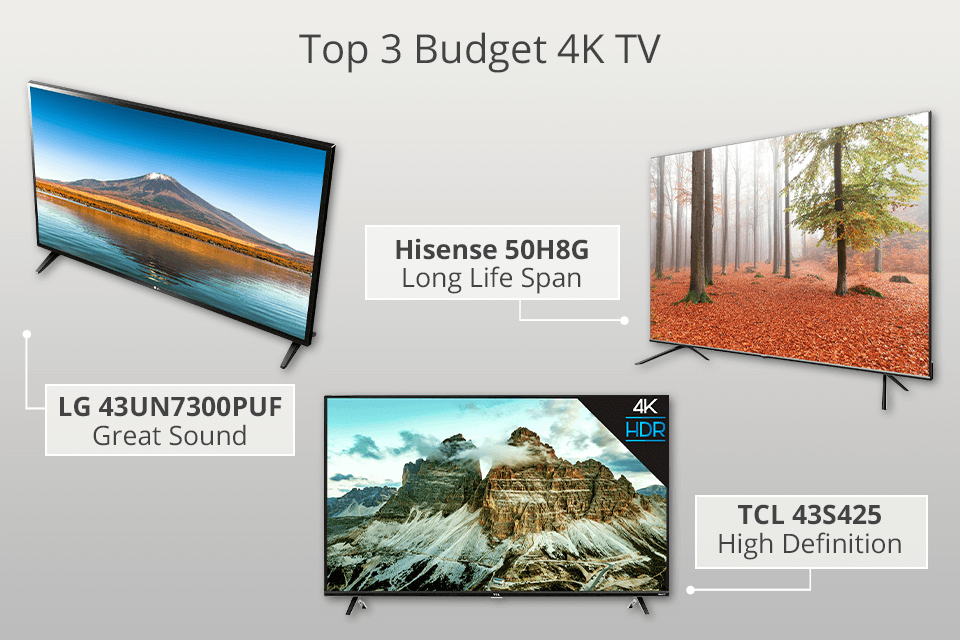
Finding the best budget-friendly 4K TV is no longer about settling for a lackluster picture. Today, manufacturers like TCL, Hisense, and even LG have mastered the art of balancing cost with performance. This guide will walk you through the essential technical specifications, smart features, and buying strategies, helping you understand How to find and select the best budget-friendly 4K TVs to ensure you get the most “bang for your buck” this year.
Understanding the “Budget” Landscape in 2026
When we talk about budget TVs in 2026, we aren’t talking about “cheap” in the derogatory sense. We are talking about value-oriented engineering. Modern budget TVs now utilize advanced panel technologies—such as Mini-LED and Quantum Dot (QLED)—which were exclusive to premium sets just a few years ago.
The primary difference between a $500 budget set and a $2,000 flagship often comes down to peak brightness, advanced local dimming zones, and premium build materials. For most living rooms, a high-quality budget model provides 90% of the visual experience at 30% of the price.
Key Factors to Evaluate
Panel Type: Look for VA panels for better contrast or IPS panels for wider viewing angles.
Refresh Rate: Aim for 120Hz if you are a gamer; 60Hz is perfectly sufficient for daily streaming.
HDR Support: Ensure the TV supports Dolby Vision or HDR10+ for superior dynamic range.
How to Select the Right Screen Size for Your Space
One of the biggest mistakes consumers make is choosing a TV based solely on price without considering the viewing distance. In 2026, the “sweet spot” for most homes is a 55-inch to 65-inch display. These sizes offer the best price-to-performance ratio because they are produced in the highest volumes.
If you are sitting about 6 to 9 feet away from your screen, a 65-inch 4K TV will provide an immersive experience without pixelation. If you go too small, you lose the benefit of the 4K resolution; if you go too large for a small room, you may notice motion artifacts more easily.
Decoding the Smart TV Ecosystems
The “brain” of your TV is just as important as the panel itself. In 2026, the smart platform determines how fast your apps load and how easy it is to find your favorite content. When searching for the best budget-friendly 4K TV, pay attention to the operating system:
- Google TV: Widely considered the gold standard for 2026. It offers the best recommendation engine and massive app support.
- Roku TV: The king of simplicity. If you want a user interface that never lags and is incredibly easy for everyone in the family to use, choose a Roku-integrated model.
- Fire TV/Vidaa: These are often found on the most affordable models. They are highly functional but may feature more advertisements than the premium platforms.
The Gaming Advantage: Features for Modern Consoles
If you own a PS5, Xbox Series X, or a high-end gaming PC, you need specific features to unlock the potential of your console. Even on a budget, you should prioritize models that include HDMI 2.1 ports.
HDMI 2.1 allows for Variable Refresh Rate (VRR) and Auto Low Latency Mode (ALLM). These features are vital for reducing screen tearing and input lag during fast-paced gameplay. Many budget-friendly 4K TVs in 2026 now include a dedicated “Game Mode” that automatically optimizes these settings, saving you the headache of manual calibration.
Why Local Dimming Matters for Picture Quality
You will often see the term “Local Dimming” in product descriptions. This refers to the TV’s ability to dim specific areas of the screen while keeping others bright. This is crucial for achieving that “inky black” look that makes colors pop.
In the budget category, avoid TVs that are “Direct Lit” without any dimming zones if you prioritize movie watching. Instead, look for Full Array Local Dimming (FALD) or Mini-LED budget models. These technologies provide significantly better contrast ratios, which is the single most important factor in perceived image quality.
Top Tips for Finding the Best Deals
To secure the best price on a high-performing 4K TV, timing is everything. While Black Friday remains a staple for electronics, 2026 has seen a trend of “flash sales” occurring throughout the year, particularly during the transition between older and newer models (usually in the spring).
Check the “Previous Year” Models: Retailers often discount last year’s top-rated budget TV when the new series drops. These models are usually 95% identical to the new ones but can be found for $100–$200 less.
Price Comparison Extensions: Use browser tools to track the price history of a specific model. This prevents you from buying a TV that is currently at its “inflated” price point.
Read Professional Reviews: Don’t just trust the star rating on a retail site. Look for professional reviews that measure peak brightness (nits) and color accuracy. A TV might have 5 stars, but if its peak brightness is under 300 nits, it won’t handle HDR content well.
Essential Maintenance and Calibration Tips
Once you bring your new 4K TV home, a few simple adjustments can make it look like a much more expensive model. First, turn off the “Motion Smoothing” or “Soap Opera Effect” in the settings. This is the most common complaint among viewers and is easily fixed.
Next, calibrate your Picture Mode. Most TVs ship in “Vivid” or “Dynamic” mode, which distorts colors and pushes brightness to uncomfortable levels. Switch to “Movie” or “Cinema” mode for the most accurate color reproduction intended by the film’s creators.
Finally, keep your firmware updated. Manufacturers frequently push updates that improve performance, fix bugs, and add new features to the smart interface. A quick check in your settings menu once a month ensures your TV remains as fast and capable as the day you bought it.
Conclusion: Value is the New Luxury
Selecting the best budget-friendly 4K TV in 2026 is an exercise in prioritizing what matters most to your lifestyle. This article has aimed to simplify How to find and select the best budget-friendly 4K TVs. By focusing on panel technology, smart platform compatibility, and gaming features like HDMI 2.1, you can find a display that punches well above its weight class.
Remember, the goal isn’t to find the “perfect” TV, but the perfect TV for your specific needs. Whether you prioritize a massive screen for sports, a fast refresh rate for gaming, or a simple interface for streaming, the options available today are better than they have ever been. Take your time, compare the specs, and enjoy the cinematic experience from the comfort of your own living room.
To truly master the art of selecting a budget-friendly 4K TV, it’s crucial to delve deeper into the specific technologies and features that differentiate models, even within similar price brackets. Understanding these nuances will empower you to make an even more informed decision.
Diving Deeper into Display Technologies for the Budget-Conscious
While most budget 4K TVs utilize LED-backlit LCD panels, there are variations that significantly impact picture quality:
LED/LCD Panel Types (VA vs. IPS):
Vertical Alignment (VA) panels are common in budget sets and offer superior contrast ratios and deeper blacks when viewed head-on. This makes them excellent for dark-room viewing or if you typically watch from a central position. The trade-off is often narrower viewing angles, meaning colors and contrast can wash out when viewed from the side.
In-Plane Switching (IPS) panels, while less common in budget large-screen TVs, provide much wider viewing angles with less color shift. However, their native contrast ratio is typically lower, resulting in grayer blacks. If your living room setup involves multiple viewing positions or wide seating arrangements, an IPS panel might be preferable, but be prepared for less impactful dark scenes.
Always check reviews to determine the panel type if the manufacturer doesn’t explicitly state it, as it significantly impacts the viewing experience.
Backlighting and Local Dimming:
Direct-lit vs. Edge-lit: Direct-lit panels (where LEDs are placed behind the entire screen) generally offer more uniform brightness and better potential for local dimming than edge-lit panels (LEDs along the edges). While full-array local dimming (FALD) is a premium feature, even basic direct-lit setups can provide a more consistent image on a budget.
Local Dimming Zones (or lack thereof): True local dimming significantly enhances contrast by dimming specific areas of the screen. In budget TVs, local dimming is often limited to a few vertical zones or is entirely absent. While a TV might advertise “dynamic contrast,” this is usually software-based and less effective than hardware local dimming. Don’t expect miracles in this area on budget sets, but if you find a model with even a basic local dimming implementation, it’s a significant plus.
QLED Technology’s Rise in the Budget Segment:
Quantum Dot LED (QLED) technology, once exclusive to high-end models, has become increasingly accessible through brands like TCL and Hisense. QLED TVs use a layer of quantum dots to enhance color vibrancy and brightness. For budget buyers, this means you can now get significantly wider color gamuts and higher peak brightness (crucial for HDR performance) at price points that were previously impossible. While not quite reaching OLED’s perfect blacks, a good budget QLED offers a compelling balance of bright, colorful images and decent contrast for its price.
Unpacking High Dynamic Range (HDR) Standards on a Budget
Most 4K TVs today support HDR, but the quality of that support varies wildly. Understanding the different standards is key:
HDR10: This is the baseline, open-source HDR format supported by virtually all HDR-compatible TVs. It uses static metadata, meaning the brightness and color information for the entire movie or show is set once.
HLG (Hybrid Log-Gamma): Primarily used for broadcast TV, HLG is designed to be backward compatible with SDR displays while still providing an HDR experience on compatible TVs. It’s less common for streaming services.
Dolby Vision & HDR10+: These are advanced HDR formats that use dynamic metadata. This means the brightness and color information can change scene-by-scene or even frame-by-frame, allowing for a much more nuanced and impactful HDR presentation. Dolby Vision is more widely adopted across streaming platforms (Netflix, Disney+, Apple TV+) and devices. HDR10+ is an open-source alternative gaining traction, particularly with Amazon Prime Video and certain Blu-ray players.
Why dynamic HDR matters: On a budget TV, where peak brightness might be limited, dynamic metadata can make a significant difference. By optimizing the image on a scene-by-scene basis, Dolby Vision or HDR10+ can extract more detail from highlights and shadows, making the limited brightness go further and creating a more visually engaging experience. If a budget TV offers Dolby Vision support, it’s a strong indicator of better HDR potential.
Navigating Smart TV Platforms: User Experience and Performance
The built-in smart TV platform is your gateway to streaming content. While many budget TVs come with smart features, their performance can differ:
Roku TV: Known for its extremely simple, user-friendly interface and vast app selection. It’s often very responsive even on budget hardware, making it a reliable choice.
Google TV (or Android TV): Offers deep integration with Google services, voice control, and a highly customizable interface. It can be more resource-intensive, so ensure the TV’s processor is up to the task to avoid lag.
WebOS (LG) & Tizen OS (Samsung): These proprietary platforms are typically found on those brands’ higher-end models, but sometimes trickle down to their entry-level sets. They are generally polished, fast, and intuitive.
Proprietary/Lesser-known OS: Some budget brands might use their own, less refined operating systems. These can sometimes be slower, have fewer app options, or receive less frequent updates.
The External Streaming Stick Argument: If a budget TV’s built-in smarts feel sluggish or lack desired apps, remember that a dedicated streaming stick (like a Roku Express, Amazon Fire TV Stick, or Google Chromecast with Google TV) can provide a superior experience for a modest additional cost. This allows you to prioritize picture quality in the TV purchase, knowing you can upgrade the smart features later.
Connectivity Essentials: HDMI 2.0 vs. HDMI 2.1 and Beyond
Future-proofing your budget TV purchase involves understanding connectivity standards:
HDMI 2.0: Sufficient for 4K content at 60Hz. Most budget TVs will feature multiple HDMI 2.0 ports.
HDMI 2.1: While true full-bandwidth HDMI 2.1 (48Gbps) is rare on budget TVs, some models may include specific features of HDMI 2.1, such as:
eARC (Enhanced Audio Return Channel): Essential if you plan to connect a soundbar or AV receiver and want to pass high-quality, uncompressed audio formats (like Dolby Atmos) from your TV’s built-in apps.
ALLM (Auto Low Latency Mode): Automatically switches the TV to a low-latency game mode when a gaming console is detected.
VRR (Variable Refresh Rate): Synchronizes the TV’s refresh rate with the console’s output to eliminate screen tearing. While full 4K@120Hz VRR is unlikely on a budget set, even 1080p/1440p VRR can be a boon for gamers.
If you’re a serious gamer with a PlayStation 5 or Xbox Series X, look for at least one HDMI 2.1 port with ALLM and VRR, even if it’s not full 48Gbps bandwidth, as this will significantly enhance your gaming experience.
Other Ports: Ensure enough USB ports for external drives, an optical audio out if your sound system requires it, and Wi-Fi capabilities (preferably Wi-Fi 5 or 6 for stable 4K streaming).
Beyond the Specs: Optimizing Your Budget TV Experience
Once you’ve made your purchase, a few simple steps can elevate your viewing:
Picture Settings & Basic Calibration: Don’t stick with the default “Vivid” or “Dynamic” modes, which often oversaturate colors and crush details. Switch to “Movie,” “Cinema,” or “Custom” mode. Then, make basic adjustments:
Backlight/Brightness: Set it to a comfortable level for your viewing environment.
Contrast: Adjust to ensure bright whites are detailed without clipping.
Brightness (Black Level): Fine-tune to ensure dark details are visible without appearing washed out.
Color Temperature: Choose “Warm 1” or “Warm 2” for more accurate, film-like colors, as “Cool” often gives a blue tint.
Many reputable review sites (like RTINGS.com or CNET) provide recommended picture settings for popular budget models, which can be a fantastic starting point.
Sound Quality Solutions: Built-in speakers on budget TVs are almost universally subpar. They often lack bass, clarity, and overall richness. A budget soundbar is the single most impactful upgrade you can make to your home theater experience. Even a simple 2.0 or 2.1 channel soundbar can dramatically improve dialogue clarity and overall audio immersion. Brands like Vizio, TCL, and Insignia offer excellent value soundbars that connect easily via HDMI ARC or optical audio.
The Enduring Value of Informed Choices
In conclusion, the journey to finding the best budget-friendly 4K TV is less about chasing unattainable perfection and more about making intelligent compromises and maximizing value. By understanding the nuances of display technologies, HDR formats, smart platforms, and connectivity, you gain the power to discern genuine quality from marketing hype. The market for affordable 4K TVs is more competitive and feature-rich than ever before, offering an unprecedented opportunity to bring a compelling cinematic experience into your home without breaking the bank. With a little research and a clear understanding of your priorities, you can confidently select a display that not only meets your needs today but continues to delight you for years to come. Enjoy the spectacular world of 4K entertainment!